¶ Patching GTA IV for GTA Connected
Video tutorial: Watch on YouTube — follow along if you get lost.
These instructions are for GTA IV: The Complete Edition (Steam). This method does not modify your original game files — you can still play the normal game after patching.
If you want to play 3D era games, follow this guide: Downgrading
¶ What You Need
- GTA IV: The Complete Edition installed on Steam
- GTA Connected installed
¶ Step 1 — Download the Patch
¶ Step 2 — Install the Patch
- Extract the downloaded
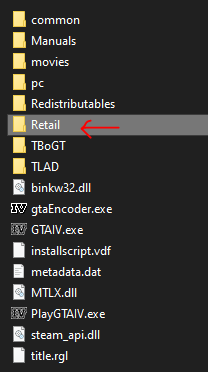
.zipfile. You will get a folder calledRetail. - Move the entire
Retailfolder into your GTA IV directory.
Default Steam path:
C:\Program Files (x86)\Steam\steamapps\common\Grand Theft Auto IV\GTAIV\
⚠️ Do not move files out of the
Retailfolder. Do not overwrite existing files.
¶ Step 3 — Configure GTA Connected
- Open the GTA Connected launcher.
- Go to Tools → Game Settings.
- Select Grand Theft Auto IV from the dropdown.
- Next to Game EXE Path, click Browse and select:
C:\Program Files (x86)\Steam\steamapps\common\Grand Theft Auto IV\GTAIV\Retail\GTAIV.exe
- Go to Tools → Launcher Settings and set your player name.
¶ Step 4 — Join a Server
- Open GTA Connected.
- Double-click any server in the server browser to connect.
¶ Step 5 — Join a Lobby In-Game
- Press UP to open the in-game phone.
- Go to Multiplayer → Games.
- Select Custom Match to see active lobbies.
- Double-click a lobby to join.
- If double-click does not work, press DOWN then ENTER.
💡 Press TAB to view the scoreboard (if the server has it). Use Quick Match in the phone menu to skip the lobby list.
Press Y to chat in-game.
¶ FAQ
¶ Will this break my normal GTA IV?
No. Your original files are untouched. Steam and Rockstar Launcher will not affect the patch. GTA Connected only uses the Retail folder.
¶ How do I customize my character?
- Open the phone.
- Create a Deathmatch lobby.
- Press M to open the character customization menu.